

When you are starting lino printing, one of the first things that can feel confusing is choosing between different lino cutting tools. Two of the most common shapes are U tools and V tools.
Both are used to carve lino, but they create very different marks. Understanding the difference between them will help you choose the right tool for lines, texture, detail and clearing areas in your lino print.
Table of Contents
What Do Lino Cutting Tools Do?
Lino cutting tools are used to remove parts of the lino block. The areas you cut away will usually remain unprinted, while the raised surface left behind holds the ink and prints onto the paper.
This means the shape of your cutting tool has a big effect on the final print. A sharp, narrow tool will create crisp lines, while a rounded tool will create softer, smoother marks.
The two most common blade shapes are:
- V tools, which cut sharp, angled grooves
- U tools, which cut rounded, scoop-like grooves
Both are useful, and many printmakers use a mixture of U and V tools in the same design.
What Is a V Lino Cutting Tool?
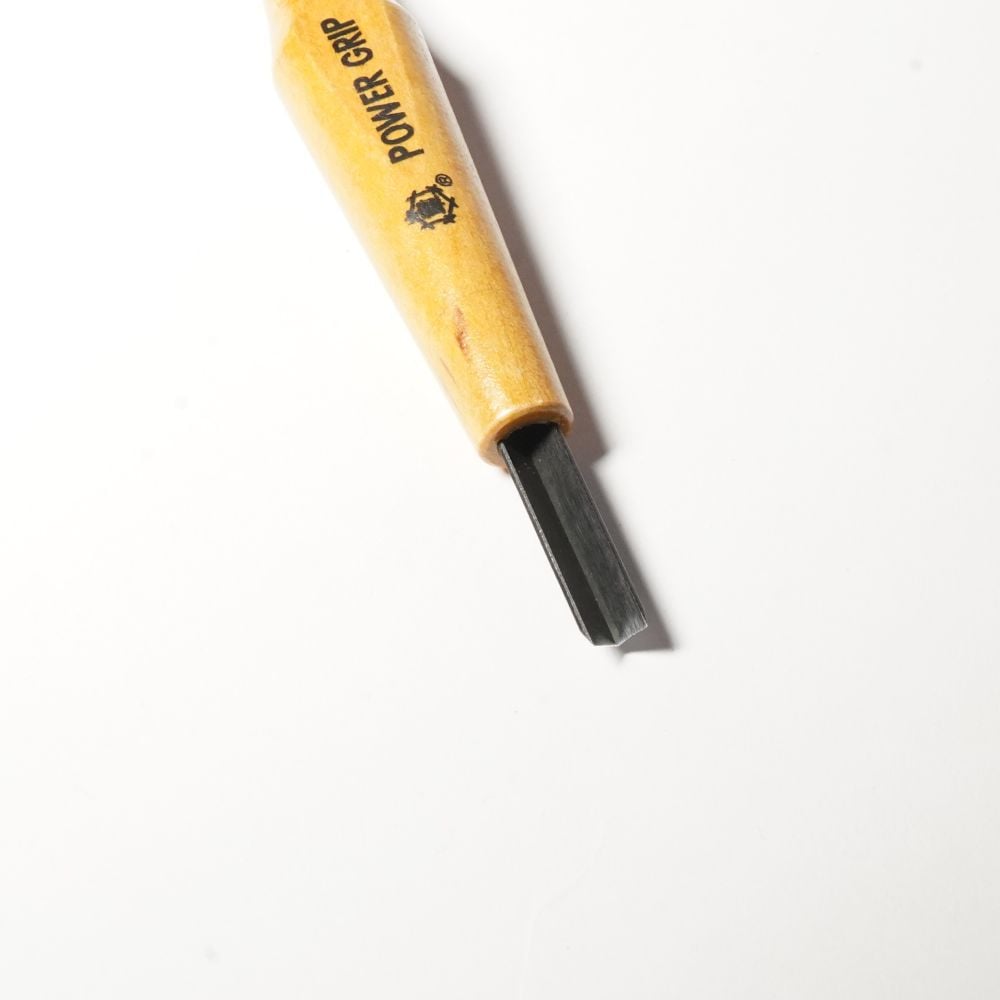
V Shaped Blade on Power Grip Lino Cutting Tool
A V tool has a blade shaped like a small “V”. When pushed through the lino, it removes a narrow, pointed groove.
This makes it ideal for cutting crisp lines and detailed marks. Because of the sharp V shape, the tool creates a more defined cut, often similar to drawing with a pen or pencil.
V tools are useful for:
- Fine outlines
- Detailed line work
- Cross-hatching
- Hair, fur, grass and texture
- Decorative patterns
- Small marks and fine details
- Controlled, drawing-style cuts
A smaller V tool is good for very fine lines and delicate detail, while a larger V tool can be used for bolder outlines and more expressive marks.
What Is a U Lino Cutting Tool?
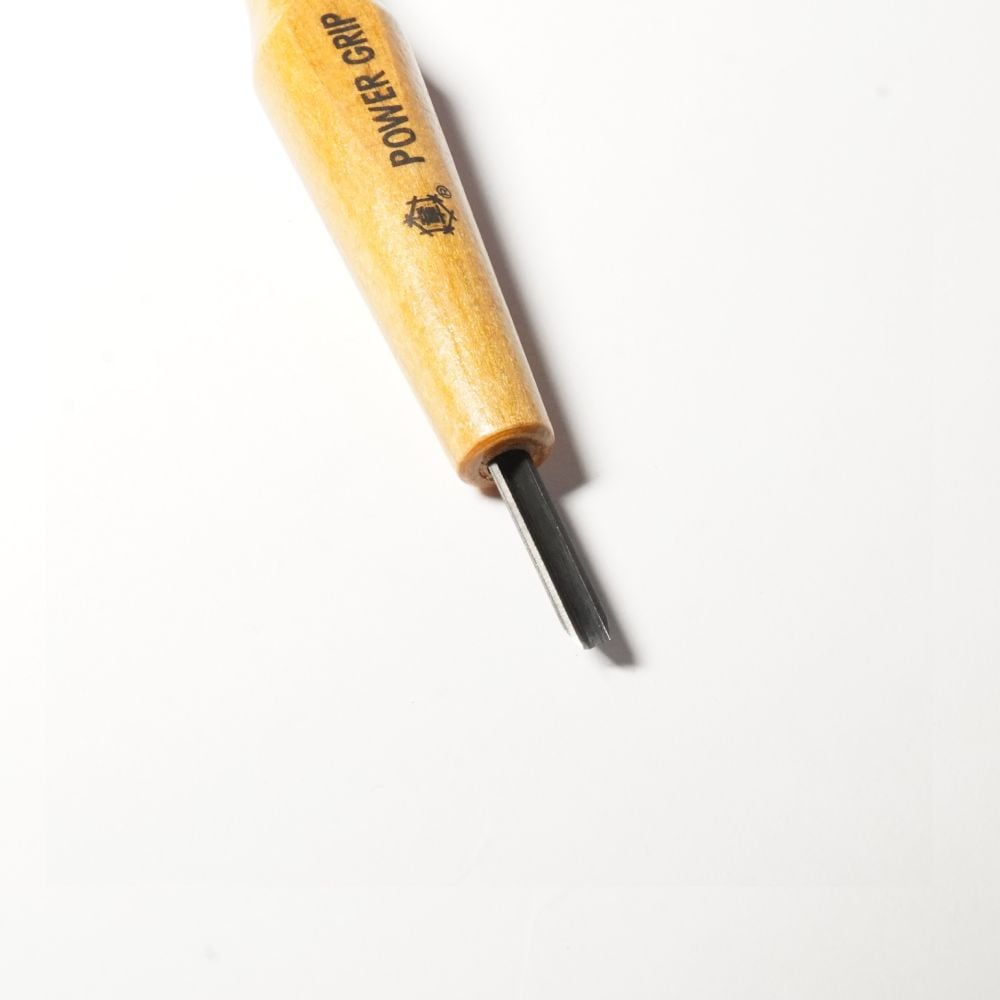
U Shaped Blade on Power Grip Lino Cutting Tool
A U tool has a rounded blade, more like a small scoop. Instead of cutting a sharp V-shaped groove, it removes a smoother, rounded channel from the lino.
This makes it useful for softer lines, smoother curves and clearing areas more evenly. U tools tend to feel less sharp in the final printed mark and are often used when you want a more rounded or open cut.
U tools are useful for:
- Softer line work
- Smooth curves
- Rounded marks
- Small to medium clearing areas
- Gentle textures
- Background removal
- Cutting around shapes cleanly
A small U tool can be used for neat details and controlled marks, while a larger U tool is better for clearing bigger areas of lino.
U Tool vs V Tool: The Main Difference
The main difference is the shape of the groove they cut.
A V tool cuts a sharper, more pointed groove. This makes it better for crisp detail, outlines and fine texture.
A U tool cuts a rounder, smoother groove. This makes it better for softer marks, flowing cuts and clearing areas.
Think of it like this:
- Use a V tool when you want sharp, drawn lines.
- Use a U tool when you want smoother, rounded cuts.
Neither tool is better overall. They simply do different jobs.
Which Lino Tool Is Best for Beginners?
For beginners, both U and V tools are useful.
A V tool is often a good starting point if you want to cut outlines, details and textures. It gives you a crisp, controlled line and is useful for drawing directly into the lino.
A U tool is ideal when you want to remove more lino, carve smoother marks or create softer textures. It can also feel easier for clearing small areas because the rounded blade removes material more smoothly.
If you are building a small set of lino cutting tools, it is helpful to have at least one U tool and one V tool. This gives you more control over the style of marks in your print.
When Should You Use a V Tool?
Use a V tool when your design needs sharpness, detail or definition.
Good examples include:
- Outlining a subject
- Adding fine details to leaves, flowers or animals
- Creating hair or fur
- Adding fine texture to clothing or backgrounds
- Cutting small highlights
- Creating cross-hatching or shading effects
V tools are great for designs that rely on line work. They help create strong, graphic marks that print clearly.
When Should You Use a U Tool?
Use a U tool when you want a smoother, more rounded cut or need to remove more lino.
Good examples include:
- Clearing around a design
- Cutting soft curves
- Creating rounded highlights
- Removing small background areas
- Adding gentle texture
- Making repeated flowing marks
U tools are especially useful when you want the cut marks to feel less sharp and more natural.
Can You Use U and V Tools Together?
Yes, and this is often the best approach.
You might use a V tool for the fine outline of a design, then use a U tool to clear around it. You could also use a V tool for detailed texture and a U tool for softer background marks.
For example, if you were carving a lino print of a bird, you might use:
- A V tool for the feather lines and eye detail
- A small U tool for soft feather texture
- A larger U tool for clearing the background
Using both tools gives your print more variety and makes the design feel more controlled.
Small vs Large U and V Tools
The size of the tool affects the width of the cut.
Smaller tools, such as 1mm or 1.5mm sizes, are better for fine detail, delicate lines and small textures.
Larger tools are better for bold marks, wider lines and clearing bigger areas.
As a general guide:
- Small V tools: fine outlines and detail
- Large V tools: bold graphic lines
- Small U tools: soft detail and controlled marks
- Large U tools: clearing and wider rounded cuts
It is useful to have a few different sizes, but beginners do not need every tool straight away. A small V tool, a small U tool and a larger U tool can cover many basic lino printing projects.
Common Beginner Mistakes
One common mistake is pressing too hard. Sharp lino tools should cut smoothly without needing excessive force. If you push too hard, the tool can slip or dig too deeply into the lino.
Another mistake is using a small tool to clear large areas. Small tools are best for detail. For bigger backgrounds, use a wider U tool to save time and create a cleaner result.
It is also important to carve away from your hands and keep your fingers out of the cutting path. Lino tools are sharp, so take your time and work safely.
Simple Practice Exercise
A good way to understand the difference between U and V tools is to make a small test block.
Try carving:
- A straight line with a V tool
- A straight line with a U tool
- A curved line with each tool
- Short texture marks with both tools
- A small cleared area using a U tool
Then ink and print the block. You will usually see that the V tool creates sharper, more defined marks, while the U tool creates smoother, rounder cuts.
Final Thoughts
U and V lino cutting tools are both important, but they are used for different types of marks.
A V tool creates a sharp, pointed cut, making it ideal for outlines, fine detail and crisp texture.
A U tool creates a rounded cut, making it useful for softer marks, smooth curves and clearing areas.
For beginners, the easiest way to remember the difference is:
V tools are for sharp lines. U tools are for smooth cuts.
Once you understand how each tool behaves, you can start combining them to create cleaner, more expressive and more controlled lino prints.
FAQ
What is the difference between a U tool and a V tool?
A U tool cuts a rounded groove, while a V tool cuts a sharper, pointed groove. U tools are better for smoother cuts and clearing, while V tools are better for crisp lines and detail.
Which lino cutting tool should beginners use first?
A small V tool is useful for outlines and detail, while a U tool is useful for smoother cuts and clearing. Beginners will benefit from having both.
Are U tools good for clearing lino?
Yes. U tools are generally better for clearing lino because they remove material more smoothly than V tools. Larger U tools are especially useful for clearing backgrounds.
Are V tools good for detail?
Yes. V tools are ideal for detail, fine lines, cross-hatching, outlines and texture.
Do I need both U and V tools for lino printing?
You can start with one, but having both gives you more control. V tools are better for sharp detail, while U tools are better for smooth cuts and clearing.